Your cameras already record everything. IstmoVisionIA turns them into something that warns you: it tells the difference between buying a product and hiding it, and sends the alert to your CRM the moment it happens, with the picture.
A minute and a half: what the camera sees, what the system decides and how the alert arrives.
On the cameras you already have. If they are IP and they cover the spot that matters, they integrate over RTSP without touching the cabling.
The video does not leave your premises. It is processed on site; only the events travel to the cloud.
The alert reaches your CRM. With the picture of the moment, to decide on the spot.
The idea
Recording is not the same as finding out
Watching dozens of live screens is impossible. By the time you notice the theft, the merchandise has already left the shop and the video only serves to confirm it.
It watches, it does not just record
It analyses behaviour, movement and patterns in real time, and raises the alert while it is happening.
It tells buying from hiding
It uses a pose model —what matters is where the hands are, not just where the person is— and it does not fire on every gesture: it consolidates the whole visit and cross-checks it with the till.
It lets you act in time
The alert reaches security or management while the person is still inside the premises.
Inside your CRM
This is what a real alert looks like
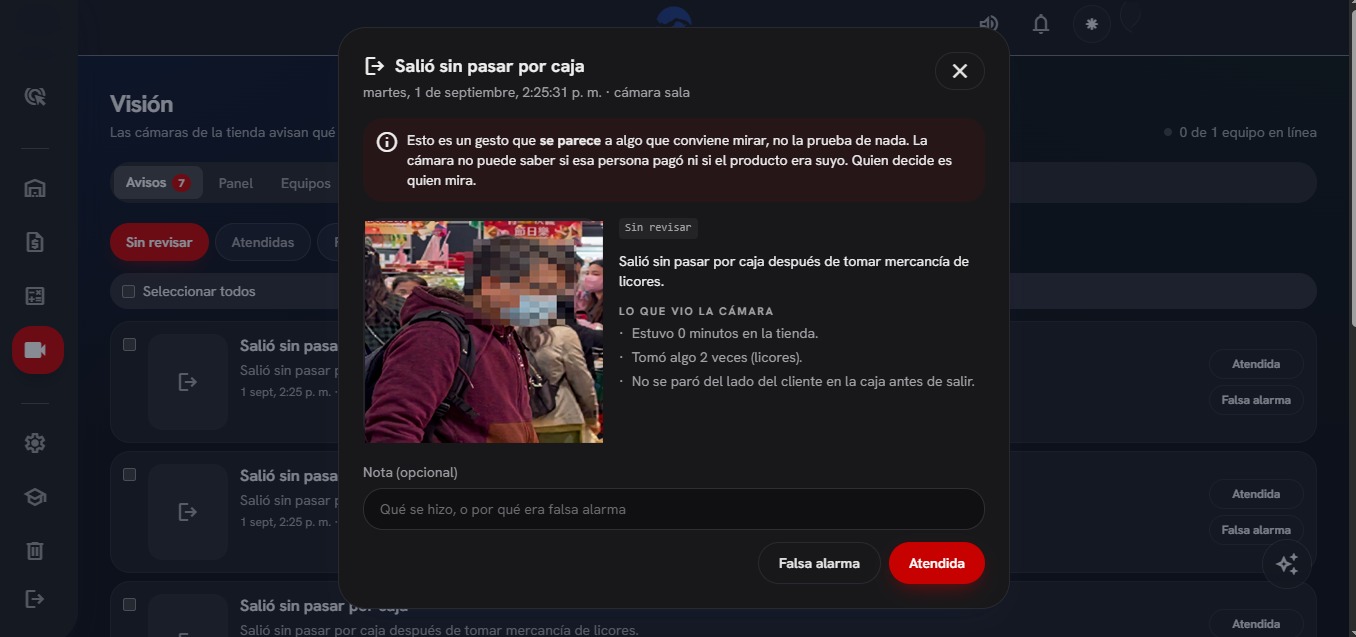
This is not a mock-up: it is the Vision module working, with a real alert. Everything the person deciding needs fits on one screen.
The picture, with the face blurred. An alert with no image asks somebody to review something they can no longer see.
What the camera saw, in plain sentences. How long they stayed, how many times they picked something up and whether they went through the till.
It is closed as handled or a false alarm. Both options carry the same weight, and that is what keeps the system tuned.
Vision module of the CRM. The band at the top reminds you, on every alert, that this is a gesture and not proof.
The four lines
The same engine, four different questions
Underneath all four runs the same engine: capture, detection, tracking and rules. What changes is which class gets detected and which condition fires an event.
ShelfTillDoorCAM 1 · FloorReview: took something to the body70%
Work frontAccessStore roomCAM 2 · AccessWalked into the work front without a helmetPPE
Front AFront BLaydownCAM 3 · BayFront B has had no activity for 41 minutes41 min
Tap a line to see what the camera watches in each setting.
Working
Shop: shrinkage and theft
Shrinkage does not show up on a camera: it turns up in the inventory a month later, when there is no longer anyone to ask.
What it watches
The hand that reaches into a shelf and comes back to the body, who leaves without going through the till, and what happens at the counter.
What you get
One alert per person with its crop and its percentage, and the cross-check with the till: merchandise handled and no sale recorded. how to reduce shrinkage.
Coming soon
Construction: protective equipment
A helmet protects nobody sitting in the boot of a car. And on the day of the accident, what gets reviewed is whether anyone was wearing it.
What it watches
Who walks into a work front without a helmet or without a vest, and in which area of the site.
What you get
The alert to the site manager at that moment, and the compliance record by day and by area: what a large client or the insurer asks for when it has to be proven. It goes hand in hand with ConstructorIA.
Coming soon
Site and plant: work front productivity
Everyone knows when a site is running slow. Almost nobody can say with numbers on which front and at what hour the day is lost.
What it watches
How many people are on each work front and at what times, when the crew actually started, how long a machine sat idle and which areas are being used.
What you get
The day's curve by area, comparable between weeks and between sites, always measured with the same criteria.
It measures the work front, not the worker. No facial recognition, nobody identified and no individual scoring.
Coming soon
Service stations: traffic and plates
No station owner can answer today, with numbers, how many vehicles come in, at what time and which of them come back.
What it watches
Every vehicle that crosses the entrance, what type it is (car, motorbike, truck, bus) and how long it stays inside.
What you get
The daily count, the hourly curve, the real mix of your customers, the ones who come back identified by licence plate and the comparison between your stations.
Counting vehicles is solid from day one. Reading the plate depends on the angle and the light, and it is tuned with photographs from the station itself: that is why they go in that order and not together.
The difference
Whoever sells you cameras hands you a count
The point of sale and the CRM are ours and live in the same system. So the camera and the till can be cross-checked, and that is where the number a camera installer cannot put together comes from.
At a service station
78%
400 vehicles came in and 310 sales were recorded. That is your real conversion, measured hour by hour and day by day. It is a management indicator, not a security accessory.
In a shop
0
A customer served for two minutes at the counter and no sale recorded in that window. A camera on its own cannot know whether somebody paid; the till can, and that is where the loss really shows up.
The cross-check is an extra, never a requirement. The module comes with its own complete dashboard and works on its own, even if the business has nothing else of ours.
How it works
The processing happens on your premises, not in the cloud
An edge device connected to your cameras over the local business network. The video is processed there and does not leave.
On your premises
The IP camera
The one you already have, if it serves RTSP and covers the spot that matters.
On your premises · 24/7
The edge device
A mini-PC where the inference runs, frame by frame. Automatic reconnection to the camera and automatic start-up after a power cut.
In the cloud
Your dashboard
One more module of your system, with its indicators and its alerts.
Only the events travel to the cloud, not the video: a few hundred bytes of JSON and, where it applies, a JPEG crop with the face blurred. There are three reasons for that, and none of them is decoration.
Cost
Uploading the video from a single camera is around 650 GB a month. With four, the upstream bandwidth will not take it. The events are a few hundred megabytes.
Continuity
The link drops. With the processing on site the system keeps working and queues the events to disk; once it is back, it uploads them complete and in order.
Privacy
Your video does not leave your premises. It is a good selling point and, with Law 81 in force, it is also the right thing to do.
The limits
What this does not do, said straight
We would rather you read this here than discover it once installed. These three things are not pending fixes: they are product decisions.
It accuses nobody. It flags a gesture for somebody to look at
No camera can know whether somebody paid, whether the product was theirs or whether what went into the pocket was their own phone. That is why the alert says "review" and never "theft", carries a percentage that never goes above 75% and goes to a person who looks at the picture. A guard who accuses an innocent customer because of what a screen said is a serious problem for the business.
It does not set off alarms on its own, and that is deliberate
A siren that gets it wrong in front of a customer costs more than the merchandise that walked out. That is why the system does not lock doors or sound off by itself: it puts the case in the hands of whoever can deal with it, in seconds and with the image in front of them. Your guard walks over, your cashier looks, your manager decides. The machine brings the speed; your people bring the judgement.
It does not fix a bad angle
A ceiling camera pointing straight down sees heads and shoulders, and hides the hands behind the person's own body. That is not fixed with software: it is fixed by moving the camera. We say so before installing, not after. More detail in whether the cameras you already have will do the job.
Personal data
A person in an image is personal data
In Panama that is governed by Law 81 of 2019, and in a shop it weighs more than anywhere else. The product was designed with that in mind from day one.
What we put in
The video never leaves the premises. Ever.
The face is blurred in every crop, pixelated as well as blurred: a soft blur can be reversed fairly well.
Configurable retention period, with automatic deletion once it is up.
What the business has to put in
The visible notice at the entrance, so anyone walking in knows there are cameras analysing.
The contract where the company is the data controller and IstmoDigital the data processor.
We hand you both of them already drafted. Neither one is optional.
The camera sees the floor; the till sees the money
If you want the technical detail of what this technology is and what it can do, it is in computer vision for business.
Turn your cameras into active protection
Tell us what worries you and what cameras you have. We will tell you straight whether they will do the job, where one would have to be moved, and what you would be seeing from day one.
It is the computer vision line of IstmoIA, IstmoDigital's artificial intelligence platform: connecting artificial intelligence to the cameras a business already has so they analyse the video as it happens and raise an alert when something occurs that somebody ought to look at. It covers four fronts: in-store theft, use of protective equipment on site, work front productivity and vehicle traffic at service stations.
Can I buy it yet?
The shop line, yes: it is built, tested and connected to the CRM, and it is the one being installed today. The other three —protective equipment on site, work front productivity and service stations— come afterwards on that same engine. The price depends on how many cameras there are and whether they will do the job, so the installation gets checked before any proposal goes out.
Do I need to buy new cameras?
Almost always no. If the premises have IP cameras with a good view of the spot that matters, the system connects to them. Sometimes one or two badly placed cameras have to be moved, because no artificial intelligence fixes a bad angle: a ceiling camera pointing straight down hides the hands behind the person's own body.
Does the video from my business leave my premises?
No. The analysis happens on a mini-PC installed on the premises themselves and the video stays there. Only the events travel to the cloud: a few hundred bytes of JSON and, where it applies, a JPEG crop with the face blurred. It is for cost, because the system has to keep working when the internet goes down, and because Law 81 treats a person in an image as personal data.
Does this accuse anyone of stealing?
No, and it is worth saying plainly: it flags gestures that look like theft so that a person can look at them. No camera can know whether somebody paid or whether what went into the pocket was their own phone. That is why the alert says "review" and never "theft", carries a confidence percentage that never goes above 75% and always goes to somebody who looks at the image and decides. What really catches loss is the cross-check with the till: merchandise handled and no sale recorded.
Does it measure each worker's productivity?
No. The productivity line measures areas and hours: how many people are on each front, when the crew started and how long a machine sat idle. It does not identify people, it does not do facial recognition and it does not build an individual ranking. It is a product decision, not a limitation waiting to be solved.